Product Information

OD3378SL
Outdoor Retractable Banner Stand w/ Graphics, Fillable Weights - Silver
View Full Product Details| Graphic with Bleeds Width x Height | 34.5" x 86.125" |
|---|---|
| Graphic Viewable Width x Height | 33.5" x 78.6" |
| Print Options | Full Color |
| Printing Type | Solvent Printing |
|---|---|
| Printing Area | Front Only, Full Bleed |
| Replacement Graphics Available | Yes |
Template Files
Artwork Guidelines & Instructions
How to Submit Artwork for Custom Printed Products
Accepted File Formats
- Adobe Illustrator CC (or earlier) - .ai or .eps
- Adobe Photoshop CC (or earlier) - .psd or .tif
- Adobe PDF - .pdf
- Photoshop files should be 100-120dpi at full output size unless otherwise specified by the template provided. (Click here for more info on DPI and other artwork tips.)
- For best printing results Vector artwork is recommended.
- Do not embed color profiles.
- Provide a layered file.
- When using stock photography images, be sure to purchase the highest resolution version that your budget will allow.
- We use CMYK printers to create these graphics. 100% reproduction of defined colors is not possible. Differences between colors in the printed and original file can occur at many different stages. Variations in color or shading are often a result of viewing on un-calibrated equipment (monitors, printers, etc). Colors will often appear different when viewed on two different monitors or output devices. Without accurate color information, we have no way of ensuring that expected colors will be achieved. Colors submitted in RGB will color shift to CMYK and may not be produced as expected.
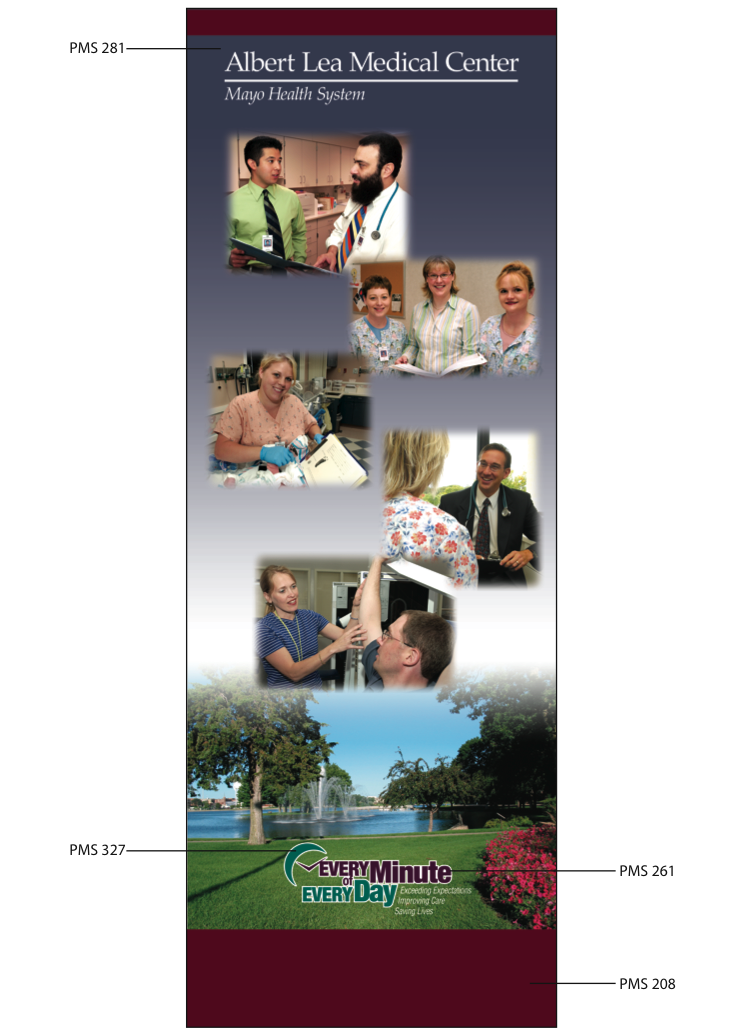
- Indicate Pantone Values for all critical colors. Click here for Pantone (PMS) color definition. (Click here for an example.) Pantone Values provided for critical colors will help ensure a close match. Colors without Pantone Values will be matched as best as possible.
- Pantone (PMS) color matching is only available for Adobe Illustrator (.ai) vector files. Pantone color matching is NOT available for Adobe Photoshop (.psd or .tiff) files.
- You'll receive a free digital proof within 2 business days of receiving your artwork.

Artwork Setup & Proofing Guide
Every order gets a free artwork review and digital proof. Follow our step-by-step instructions to prep your artwork for print.
-
Prepare Your Artwork
- Illustrator and PDF: convert all fonts to outlines & embed all images.
- Photoshop: rasterize all fonts.
- File color mode must be CMYK. If requesting Pantone matching, please provide a layered file. This allows us to make minor color corrections if necessary.
- Please send only files that are used in your graphic/design.
- Please indicate any special positioning requirements of your graphic on the product.
- Only have a small or blurry logo? Our design team can recreate it with Design Services. More info about Design Services
Safety lines on your template and proof:
- The blue dotted line marks the safe area. Keep all text and important images inside this line so they are fully visible.
- The pink/red line marks the cut line. Extend any background color or image to this line to avoid white edges on the finished product.
- These lines are guides only and will not appear on your printed product.
About color matching
We'll match your colors as closely as we can. Screens, printers, and materials all show color a little differently, so printed colors may vary slightly from what you see on your screen or from items you've ordered before.
-
Upload Your Artwork
Artwork should be submitted the same day the order has been placed to avoid delays.
Before placing your order
- Upload your artwork from the product page when you add to cart, or from your shopping cart before you place your order.
After you place your order
- After you order, you'll receive a link to the Artwork Manager, where you can upload your artwork and approve your proof.
- You can also email it to info@displays2go.com. Put "Art Attached" and your order number in the subject line.
-
Free Artwork Review
After receiving your file, your artwork will be reviewed within 2 business days for placement, sizing, and print readiness. Our team will advise you if any changes are required.
Your free artwork review includes:
- Artwork placement, sizing, and orientation
- Basic print-readiness and resolution review
- Identification of obvious production concerns
- A digital proof showing how your artwork will print
If you need help editing your artwork, we offer Design Services ($45/hr) for the following:
- Retouching or reconstructing artwork
- Correcting distorted or inaccurate image details
- Recreating low-resolution artwork
- Editing text, spelling, names, dates, or other content
- Making creative or compositional changes
-
Review & Approve Your Proof
We'll send you a digital proof. Content is printed exactly as submitted, so please review spelling, images, facts, and overall design before approving.
Please double-check:
- Spelling, names, dates, phone numbers, website addresses, and QR codes
- Logos and images, including any AI-generated artwork (look for distorted text, faces, hands, or details)
- Color requirements and safety lines
Need changes? Upload a new file or leave a comment on your proof.
Ordering more than one product? Each file must be approved before your order can move to production.
Once approved, your order moves to production and changes may not be possible.
-
We Print & Ship
Production lead time begins once you approve your proof. Your order ships using your selected shipping method.
Artwork approval, production time, and shipping time all affect how quickly you receive your product.